This tutorial will show you how to maximize the downloading potential of our favorite download manager IDM
Download Page: http://www.internetdownloadmanager.com/download.html
The First thing to do is to adjust the concurrent connections adjust it base on your connection type
STEP 1:

STEP 2:

BEFORE:

AFTER:

The Default setting is 8 but it can be doubled to 16 connections per download.
note: not all servers support this feature there are ones that allow you to reach this maximum number of connections
but there are also servers that have limited allowed connections in that case dont expect that this thing will always work.
SCHEDULED DOWNLOADING
In order to maximize your connection speed you must use it to the very last drop
there are times that when you download something and its already done your connection speed will drop and that is wasted bandwith.In order to maximize your internet plan and take the ease of this nice feature scheduled downloading.
STEP 1:

STEP 2:
Select the number of downloaded files at a time. My setting is set to 1 so that it will only download one file at a time.You can also select any number if you prefer multiple downloads at a given time but your connection speed will be divided to the number of your chosen preference.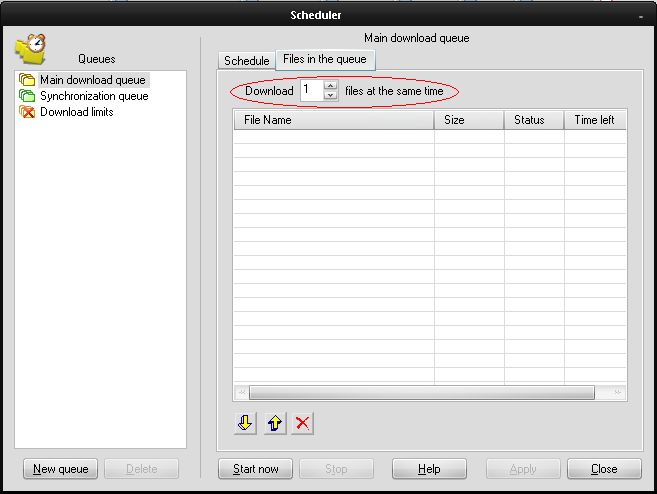
STEP 3:
Do the same in the synchronization queue

STEP 4:
This is the part when you want to proccess your downloads.Press the download laterbutton and it will be added up to your download queue.You can keep doing this even after you are downloading something it will be added up to the queue and it will not suffer your download speed.

STEP 5:
If you want to start downloading just press the start queue download button and your downloads will automatically start magically.

note: You can repeat the instruction in step 4 to keep adding files to your download queue even if you already start the queued downloading reffered in step 5.
By this technique you can keep adding files to the queue without worrying about your internet speed and you will not wait for your downloads to finish to download another file.
HAPPY DOWNLOADING............ :>