Showing posts with label Programming. Show all posts

Saturday, June 2, 2012

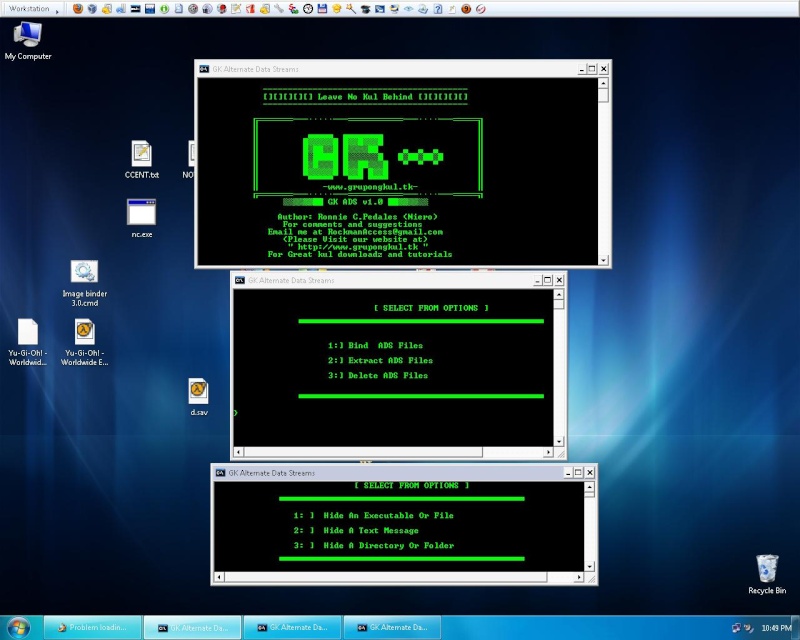
GK Alternate Data Streams


[ GK ADS  (ALTERNATE DATA STREAMS)  ]

Author: Ronnie c. Pedales ("NIERO")
Company: Grupongkul
Website: www.grupongkul.tk
E-mail: Rockmanaccess@gmail.com
YM:Rockman_xero@yahoo.com

~~~~~~~~~~~~~~~~~~~~~~~~~~~~~~~~~~~~~~~~~~~~~~~~~~~~~~~~~~~~
Version 1.0.1 September 28, 2010

NOTES:
/* FULLY FUNCTIONAL SHIFT FROM BETA REALEASE */

--BUG FIXED ON ADS EXTRACTION
--ADDED LADS ADS DETECTION UTILITY
--ADDED QUICK EDIT MODE
--ADDED INFOBOX FROM NIRCMD


Version 1.0   September  17, 2010


--MAIN PROGRAM
--Folder binding Support
--File Binding Support
--TXT binding support
--ADS Extraction
--ADS REMOVAL

~~~~~~~~~~~~~~~~~~~~~~~~~~~~~~~~~~~~~~~~~~~~~~~~~~~~~~~~~~~~


=================================
+++++++++++++++++++++++++++++++++
=================================

Description:
            Alternative Data Stream support was added to NTFS (Windows NT, Windows 2000 and Windows XP) to help support Macintosh Hierarchical File System (HFS) which uses resource forks to store icons and other information for a file. While this is the intended use (as well as a few Windows internal functions) there or other uses for Alternative Data Streams that should concern system administrators and security professionals. Using Alternative Data Streams a user can easily hide files that can go undetected unless closely inspection.
           

Functionality:

    Hides Data into  NTFS Alternate data Stream (Fork filesystem)  Data hidden by this tool is undetectable by normal users the filesize of the original file binded and its file hash remain unchanged
no matter what how many ADS files you binded to the file.   

NOTES and Known Bugs:

*    Extraction of ADS into folders is unsupported by the extract option in this release i will definitly make up an update for these
*    Files With Long File names will give an error message upon proccessing try to rename those files to short file names to fix this error
*    Alternate way of  Deleting an ADS file is to move it to an either FAT16 or FAT32 drive


HOW TO USE :????

   Easy Just drag and Drop The required files into the console window and it will do the job !
  
EXTRACTION OF ADS LOOK FOR THE COLON DELIMETER

example:

ORIGINALFILE.EXE:HIDDEN FILE.exe


The filename before the colon is the hidden data
type this filename as indicated..


=================================
+++++++++++++++++++++++++++++++++
=================================
For Bugs and Constructive Comments Please Visit Our Forum

www.grupongkul.tk

In The GK APPZ Subsection


Special Thanks To

Assasincross
alfred007
Trisj
ghello
RL
and the other forum members


Hope This app will be useful for you!!


GK  LEAVE NO KUL BEHIND  .................................


HOW TO USE ???


STEP 1:
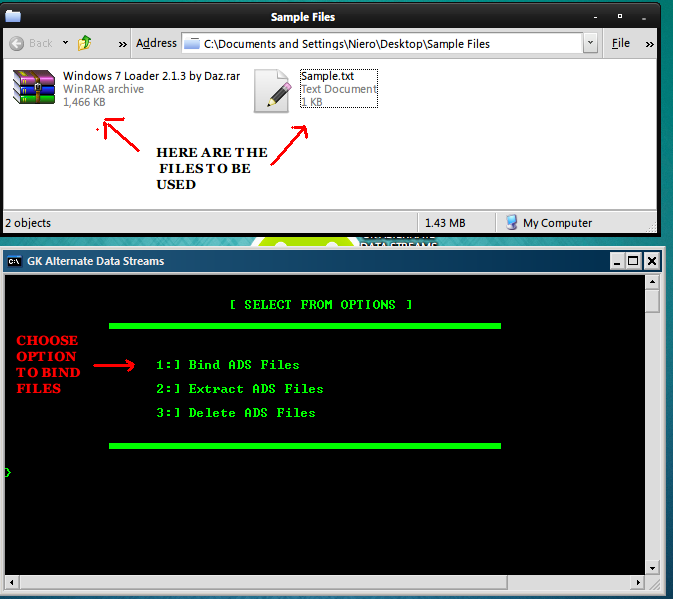


STEP 2:


STEP 3:


STEP 4:


STEP 5:


STEP 6:


STEP 7:


STEP 8:


STEP 9:


STEP 10:


DOWNLOAD HERE

Monday, July 18, 2011

GK ALTERNATE DATA STREAMS


In Microsoft's NTFS file system forks are known as Alternate Data Streams (ADS).[4] In 1993, Microsoft released the first version of the Windows NT operating system which introduced the NTFS file system. This file system includes support for multiple named forks as alternate data streams for compatibility with pre-existing operating systems that support forks. With Windows 2000, Microsoft started using alternate data streams in NTFS to store things such as author or title file attributes[5] and image thumbnails.[6] With Service Pack 2 for Windows XP, Microsoft introduced the Attachment Execution Service that stores details on the origin of downloaded files in alternate data streams attached to files, in an effort to protect users from downloaded files that may present a risk.[7]
Windows NT versions include the ability to use forks in the API, and some command line tools can be used to create and access forks, but they are ignored by most programs, including Windows Explorer and the DIR command. Windows Explorer copies forks and warns when the target file system doesn't support them, but only counts the main fork's size and it doesn't list a file or folder's streams. The DIR command has been updated in Vista to include an option that will list forks. (FROM WIKIPEDIA)


HIDE YOUR FILES INTO ANOTHER FILE USING THE MICROSOFT NTFS exploit
ALTERNATE DATA STREAMS...!


UPDATED VERSION NOW ACTUALLY WORKING TO ALL KINDS OF FILETYPE


VERSION: 1.01

Changelog:
--BUGFIXED EXTRACTION OF ADS IS FULLY FUNCTIONAL
--ADDED LADS ADS DETECTION UTILITY
--ADDED NIRCMD
--REESTABLISHED FILE PATHS FOR PORTABLILITY


Download Link:
http://2f55ef9f.linkbucks.com


Wednesday, July 6, 2011

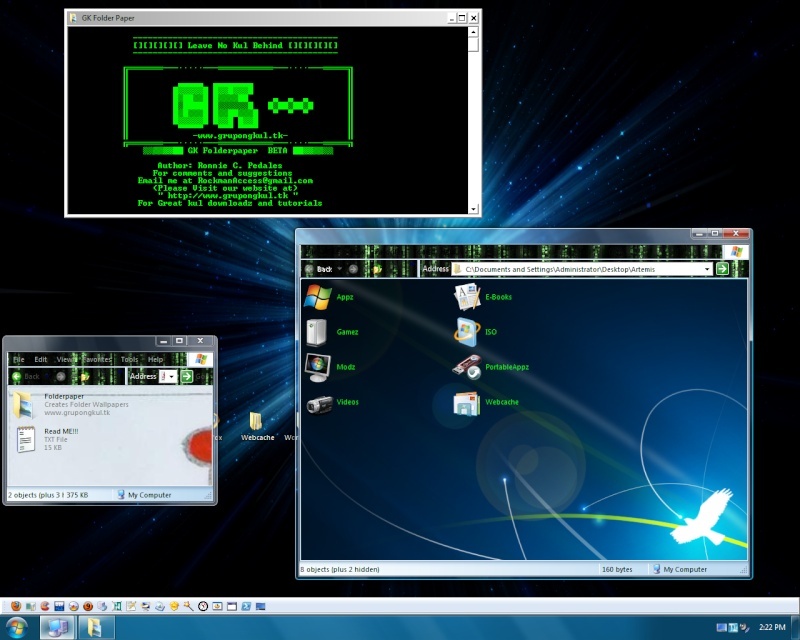
GK FOLDER PAPER


DO YOU WANT TO MAKE YOUR FOLDERS HAVE THEIR OWN cutomized WALLPAPER AND ICON's

NOTE: ONLY WORKING IN WINDOWS XP but the icon maker works also in Vista/WIN7


DOWNLOAD
LINK: http://677a7248.linkbucks.com
PASSWORD:www.grupongkul.tk


Monday, June 20, 2011

Gk Programming guidelines

Napansin ko na puro kalokohan na ang pinopost ko ng mga nakaraang
araw.Bago pa matuluyan na maging joke site ang blog na ito naisipan na
nang awtor na gumawa ng matinong entry.

Tunkol ito sa programming guidelines na kung saan ito ay
magsisilbing gabay sa mga baguhan na katulad ko.Ginawa ko itong
language independent upang mas marami ang makaadapt sa guide na
ito.Umpisahan natin

1:) Maging pamilyar at kalikutin ang mga features nang gagamitin mong
IDE (integrated development environment) o compiler.Aralin ang
shortcuts nito upang mas lalung mapabilis ang gawa ng program.


2:) Abusuhin ang autocomplete function nito.Para sa mga hard typed
languages na katulad ng Java ay nakakabilis ito sa pagproprogram.Pero
teka muna nakakabobo rin ito siguraduhin mo muna na alam mo at
kabisado mo ang ginagawa mo.Mahirap na at pag pinagprogram ka sa papel
ng prof mo at di mo ito kabisado.


3:) Huwag itype ang program nang kopyang kopya sa example itry mong
intindihin ito at bigyan nang kahulugan ang bawat parte nito.Tandaan
mo ang mahahalagang parte nito na pwede mo pang mapakinabangan.


4:) Obserbahan at itatak sa utak ang color coding na inooper ng compiler.
Ex: blue : para sa libraries
red: para sa math operation
yellow: para sa functions
green: para sa variables

5:) Aralin ang operator precedence ng language na gagawin mo kritikal
ito sa pagawa ng algorithm.


6:) Huwag magimbento ng sariling coding style o sa madaling salita ay
ang paraan nang pagsulat ng program.Magsearch at iadapt ang accepted
at standard na mga istilo na ayon sa language mo.Mga halimbawa nito ay
ang lokasyon ng paglalagay nang bracket,pagkakapitalise ng CONSTANTS
(PASCAL CASING) o Alternate casing ng CoNsTaNtS (Camel casing),ang
variables ay keywords ay always lowercase,indention,pagkokoment
atbp.Mahalaga nang masanay nang maaga dito kung balak mong maging
proffessional.


7:)Upang bumilis ang program na gagawin mo ito ang konting tips na mabibigay ko.
A:] Iwasan ang pagiinitialize ng variables nang di ankop sa data
type.Di dapat sobra o kulang ang data type na gagamitin upang
makapagsave ng memory size at bumilis ang program.

ex: kaikangan mo ng variable na maghohold nang short signed integer
at ginamitan mo ito ng long signed int o double signed int
nakakasayang ito sa memory na pwede pa sanang iaddress ng ibang
program.

B:]Iwasan ang masyadong sobrang pagamit ng whitespaces(Space) sa
program bukod na nakakaradag lang ito nang lines of code eh minsan eh
nakakabagal ito pag adik ka sa kakaenter.Treated as character din kasi
ito kaya kasama ito sa pagkokompile.Pero di ko sinabing huwag ka
gumamit kailangan ito para maging readable ang code mo.

C:]Iwasan ang pagamit ng wildcard character ( * ) sa mga library
files kung isa hanggang anim lang ang kailangan mong function ang
kailangan mo rito.Nakakabagal ang pag iinclude o pagimport nang buong
library sa program.

Ex: import javax.Swing.*

(eh joptionpane,jbutton at jpanel lang ang kailangan mong function rito)

import javax.Swing.Joptionpane
import javax.Swing.Jpanel
import javax.Swing.Jbutton

Huwag kang maging tamad sa pagtatayp nakakabobo ito.

D:]Iwasan ang overcommenting sa code mo kung gagawa ka nang program
at overdocumented ito na para bang gusto mong maging scriptwriter sa
haba ng koment na ginawa mo.Comentan lang ang core logic,algorithm,at
kung paano ito gumagana ng step by step.

E:] Sikaping ioptimize ang algorithm mo itry mo itong paliitin at
pabilisin sa pamamagitan nang math i simplify ito sa finest form pero
wag mo itong sobrahan at baka di na ito gumana.

8:) Debugging Tips naman tayo

A:> Minsan sa pagpoprogram kadalasan kung saan ka pa konpident sa
portion nito na ok na at gumagana na ay dito ka pa mismo
pumalya.Umpisahan ang pagdedebug sa mga lugar na akala mo di ka
nagkamali bago ang kritikal na parte nito.

B:> Makakatulong sa pagdedebug ang madalas na pagkokompile dito sa
kada linya o bloke na idadagdag o babaguhin mo rito.

C:> Huwag magfocus sa design o itsura nang program mo tandaan di
pagandahan ang labanan pagdating sa komputer programs kundi ang
functionality at efficiency nito.Ang pagiintroduce ng gui ay lubhang
nakaragdag sa bugs nito maykasabihan nga "as ease of use is introduced
the security of the program is compensated".

D:> Ugaliing magbakup nang mga gumaganang program bago mo ito
pakielamanan at pagexperimentuhan.Kung sakaling magkamaling magkamali
ka at di mo na ito maayos ay maibabalik mo ito sa dati.

E:> Kung di mo mahanap ang sira nang program ay pagputol putulin ito
at icheck ang bawat parte.Isaisahin sa pagkakabit hanggang sa gumana
na ito bilang isang unit.


Laging tandaan ang pagproprogram ay parang pagsusulat may sinusunod
itong set of rules o grammar.Maaring ang pagpoprogram ay di para sa
lahat pero once na napagana mo na ang pinahirapan mong
program.Kakaibang saya ang mararamdaman mo dahil sa wakas may nagawa
ka ring tama.